
This feature is currently in Beta.
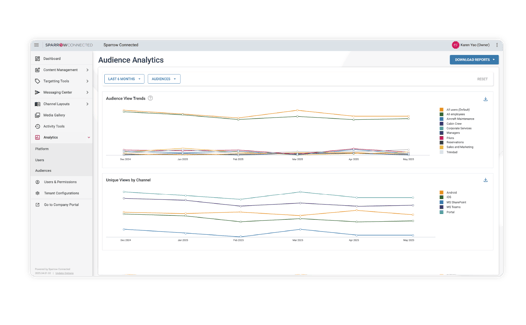
This feature provides a visual breakdown of engagement trends across all Audiences, helping you better understand viewing behavior over time and across devices.
-
Track engagement trends over time: View monthly audience activity to see how engagement changes across different audiences.
-
Identify your most and least engaged audiences: Instantly compare engagement levels across audiences.
-
Understand device preferences by audience: See which channels your audiences use most (SharePoint, Teams, Web, iOS or Android) so you can tailor communications accordingly. This is especially helpful for organizations with multi-device users.
-
Spot spikes and dips in viewership: Quickly identify trends, seasonal changes, or unexpected shifts in engagement that may require action.
-
Download detailed reports: Export reports for deeper analysis, sharing with stakeholders, or long-term tracking.
-
Filter by timeframe and audience: Customize your view to focus on specific groups or time periods.
Make smarter communication decisions with Audience Analytics. Refine your targeting strategy, optimize channel selection, and improve engagement where it matters most. Contact your Customer Success team to learn more.