![Sparrow Logo only-1.png]](https://support.sparrowconnected.com/hs-fs/hubfs/Sparrow%20Logo%20only-1.png?height=40&name=Sparrow%20Logo%20only-1.png)
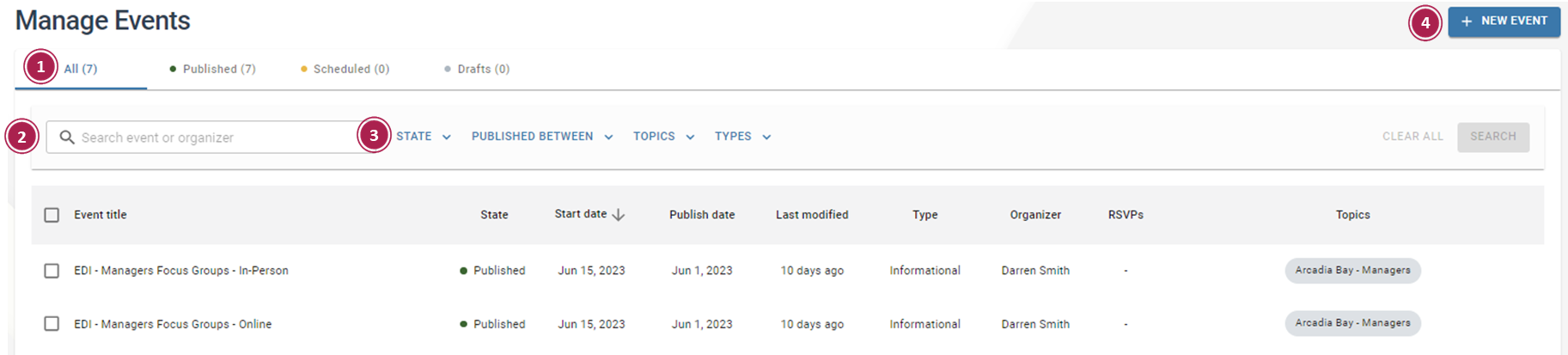
- Publishing State Tabs – A set of filter options that enable users to categorize and organize events based on their current status
- All: Displays all events, regardless of their current state.
- Published: Displays events that have been published and are available to the respective audience(s).
- Scheduled: Displays events that have been scheduled for future publication
- Draft: Displays events that have been saved but not yet published
- Search – Effortlessly locate events based on the Organizer or Event Name
- Events Filters – A set of filter options that can be applied to refine and narrow down the selection of events. The following filters can be applied individually or in combination:
- State: Filters events based on one or more states, such as Draft, Published, or Scheduled
- Published Between: Filters events based on specific published date(s)
- Topics: Filters events by one or more specific topics
- Types: Filters Events based on one or more event types
- New Event – Seamlessly generate a new event with convenience and simplicity